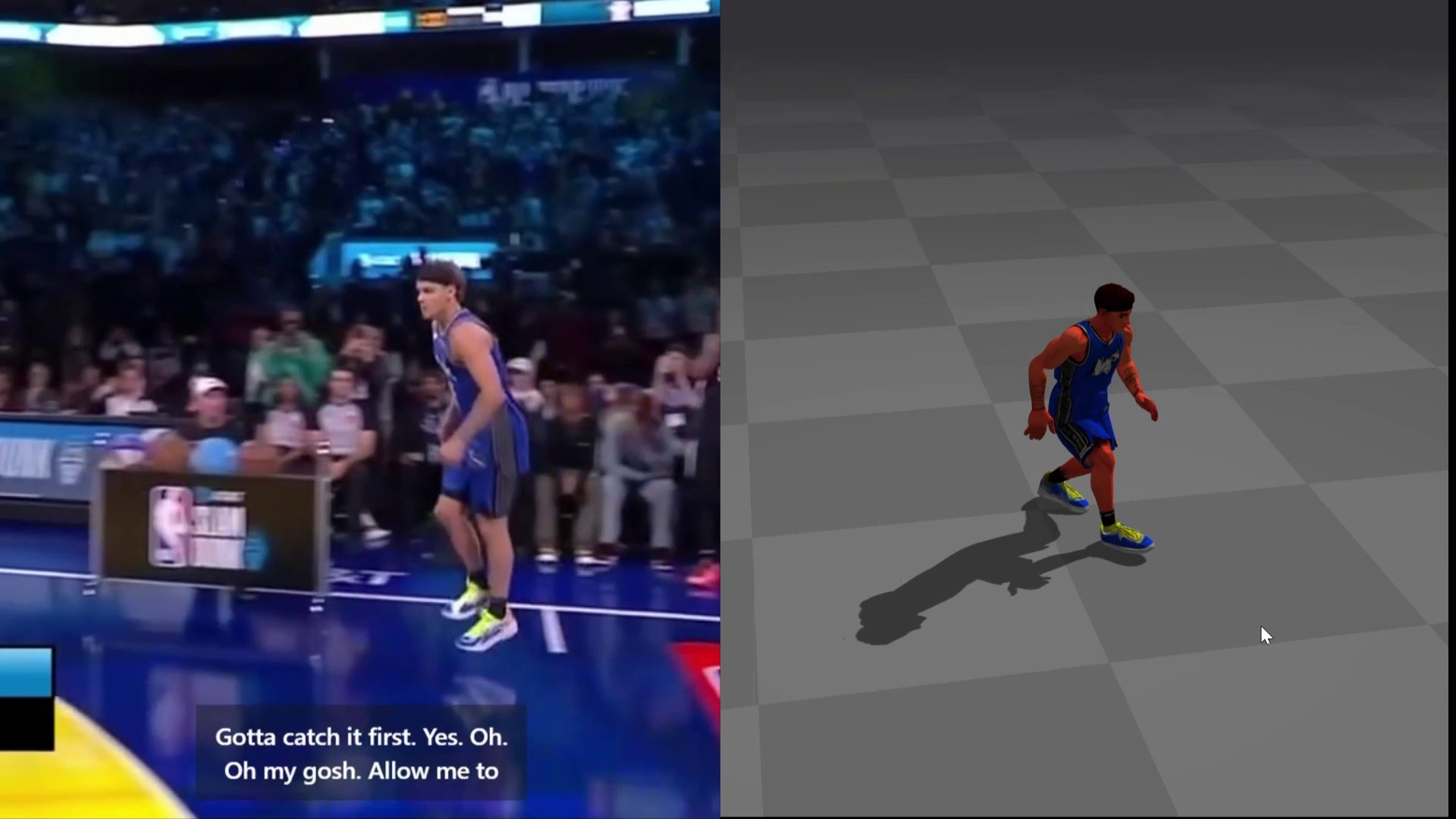

Upload a video of one person. Uthana uses AI motion capture to reconstruct the performance as 3D skeletal animation you can preview, apply to a compatible character, and export.
A video records pixels. It does not contain an explicit 3D skeleton. Uthana estimates the subject's pose across frames and reconstructs the performance as temporally consistent skeletal animation.
This is markerless motion capture: estimating 3D movement from video without attaching body markers or requiring a mocap suit. Uthana’s single-camera workflow uses footage of one person, with the full body visible, stable framing, and limited occlusion. The resulting skeletal animation is estimated from the footage rather than measured as marker-based ground truth.
The result is editable character motion—not a new rendered scene. Preview it, apply it to another compatible bipedal character, refine it in an animation tool, or export it into the rest of the production workflow.
The self-serve workflow uses ordinary single-camera footage. It does not require a marker suit or multi-camera capture stage. Because the result is estimated from video, it should not be described as marker-based ground truth or guaranteed physical measurement.
Start with a continuous video of one person performing the movement you want to capture. A phone video can work when the full body is visible and the footage follows the requirements below.
Uthana reconstructs the performance as full-body skeletal motion. Preview the result and inspect whether the timing, facing, major gestures, feet, and hands preserve the parts of the performance that matter.
Use a built-in character or apply the motion to your own compatible bipedal character through Uthana retargeting. If the character does not have a usable skeleton, Auto-Rigging can add one before the motion is applied.
Download the animated result and continue working in the DCC or engine used by your production team. Review the curves, timing, contacts, and target-character fit as part of the normal animation workflow.
Download self-serve results as FBX, GLB, or BVH, with 24, 30, or 60 fps output options. Choose a compatible character for the motion, then continue editing the result in the rest of the animation pipeline.
Each model answers a different production question. Pick the input that carries the information you already have.
You already have footage that shows the timing and body movement you want to reconstruct. The performance itself is the reference.
Try Video-to-MotionDirection, speed, stride count, repeatability, and movement style should come from explicit controls.
Create controllable locomotionYes. A phone or ordinary camera can provide usable footage when the video meets the supported file requirements and keeps one person's full body clearly visible. Stable framing, even lighting, and limited occlusion generally provide a stronger source.
Yes, if the character is compatible with Uthana's bipedal workflow. Use retargeting to apply the reconstructed motion. If the character is unrigged, Auto-Rigging can first add a compatible skeleton.
Video-to-Motion includes finger motion, but the result depends on whether the hands are visible in the footage and whether the selected target character carries compatible finger joints. It should not be treated as a guarantee of exact finger contact.
Self-serve results can be downloaded as FBX, GLB, or BVH at 24, 30, or 60 fps. The result remains editable skeletal animation rather than a finished rendered scene.
Video-to-Motion costs $0.05 per second of input video, with no required subscription or minimum commitment. See the Pricing page for current rates.
Use video when the timing and body movement of a specific reference performance matter. Use Text-to-Motion when the action is easier to describe, and use Locomotion when travel behavior should come from explicit controls.
Upload a video, reconstruct the movement as editable 3D animation, and apply it to a compatible character.