

Map captured or video-derived human movement to the joint structure and output requirements of a target humanoid robot.
Human and robot bodies differ in proportions, joint axes, degrees of freedom, range limits, and dynamics. A valid human pose may be unreachable or unstable for the target machine. Copying source joint angles into robot joints does not solve the transfer problem.
Uthana first represents the human movement as structured 3D motion, then configures the mapping around the target robot embodiment. The engagement defines the target joint structure, operating constraints, output convention, and validation checks.
A human performance transferred through Uthana’s motion representation to a humanoid robot platform. The footage shows a working transfer pipeline, not a conceptual render.
Each engagement begins with the target robot’s kinematic structure, joint convention, operating limits, and downstream execution requirements. Uthana and the customer define the source motion, mapping, output structure, and acceptance test before scaling the delivery.
The exact robot-description format, additional constraints, simulator packaging, and runtime integration are engagement-specific.
Robot retargeting can begin with marker-based studio motion or 3D motion extracted from video. Using one structured human-motion representation reduces the need to rebuild the source pipeline every time the motion source changes.
Uthana provides a documented CSV export for the Unitree G1. A motion ID is converted into a G1 robot trajectory for use in the customer’s own playback or controller workflow. The current path uses a raw authenticated HTTP request and is not yet included in Uthana’s official Python or JavaScript clients.
You do not need the API to use it. Unitree G1 retargeting is already available in the Uthana app: click Download at the bottom right of the motion view, choose Unitree G1 (.csv) in the Download motion dialog, and the export downloads directly. The file contains the G1's actuator rotations frame by frame at 30 frames per second.
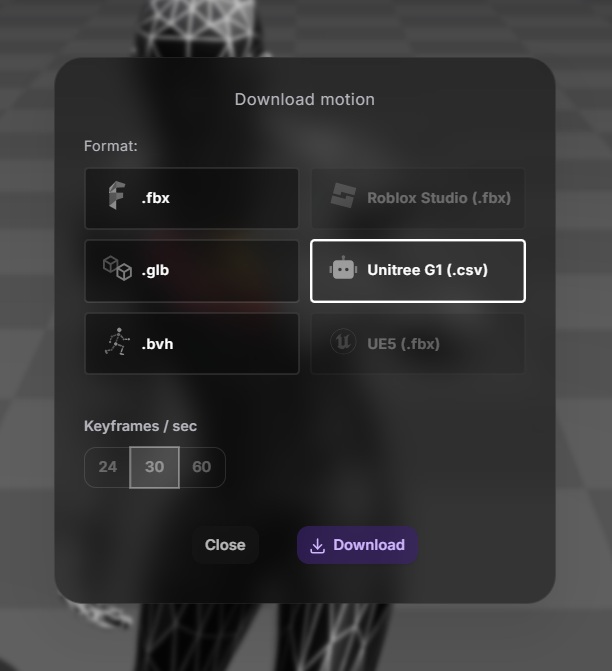
The CSV is a target-specific motion output, not a claim of safe hardware control or dynamic feasibility. Robot-side integration, controller behavior, and hardware validation remain the customer’s responsibility unless explicitly included in a scoped engagement.
A retargeted sequence should be evaluated against the target embodiment and downstream workflow before a larger data program begins. Useful acceptance checks may include pose fidelity, joint-range compliance, timing, trajectory behavior, and successful ingestion into the target stack. The exact checks must be agreed for the project.
Uthana does not describe a retargeted kinematic sequence as dynamically feasible or hardware-ready by default.
Bring the target embodiment, a representative motion, the required output structure, and the downstream validation criteria. We will scope the transfer around that system.
Start generating motion today, or work with us on a custom dataset, embodiment system, or simulation program.