

Video-to-Motion 3.0 improves hand and finger detail and reduces foot sliding.
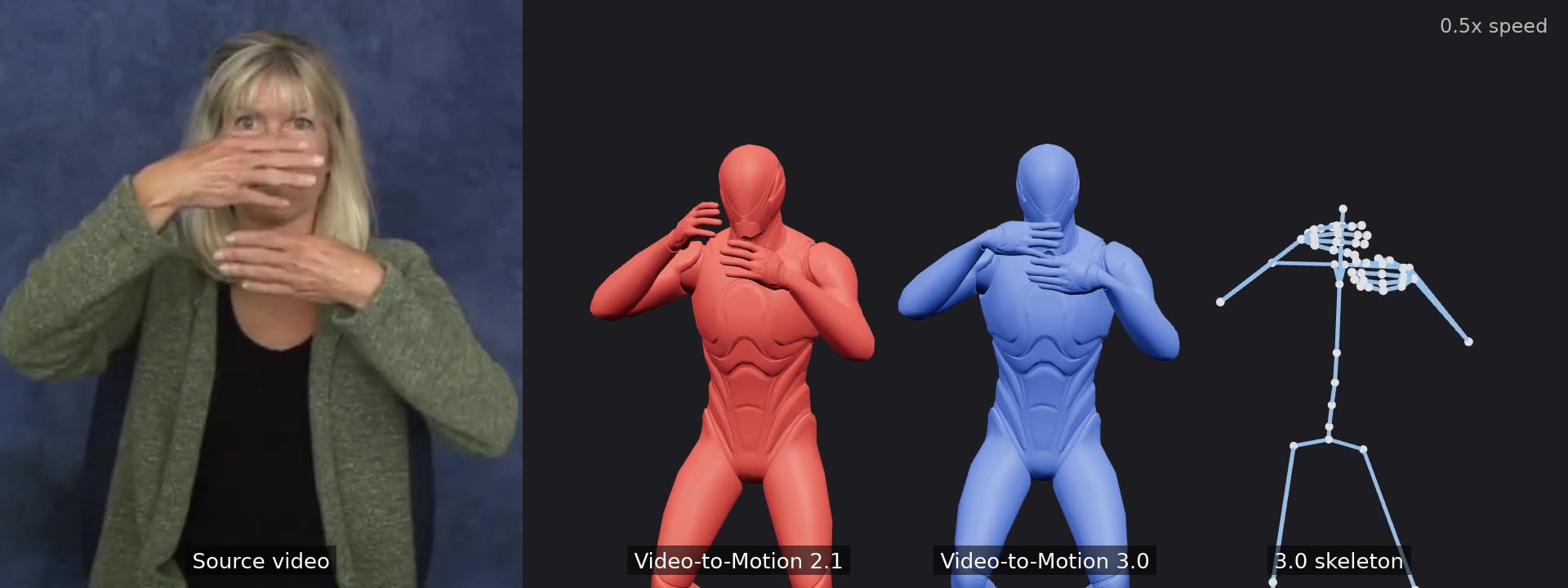
Today we're releasing Video-to-Motion 3.0. It improves two details that decide whether captured motion looks right: what the hands are doing, and whether the feet stay planted.
The workflow hasn't changed. Upload a video of one person, get back editable skeletal motion, apply it to your character and export FBX, GLB or BVH. What changes is how much of the original performance survives the trip.
Video-to-Motion has captured finger motion since 2.0. Version 3.0 adds a dedicated hand refinement step, so finger poses come through more clearly: an open hand stays open, a pointed finger stays pointed, and hand shapes that change mid-gesture are easier to read on the character.
That matters most when the hands carry the meaning: gestures, signing, counting, grips and anything a character does with its hands close to the camera.
Sliding feet are one of the quickest ways to make captured motion look wrong. Video-to-Motion 3.0 adds foot IK, which adjusts the legs so a foot that should be planted stays put. You'll see less sliding during weight shifts, pauses and steps.
Video-to-Motion 3.0 sits alongside the existing versions. Pick it in the model selector in the app, or pass the model value video-to-motion-3.0 in the API. You can also run two versions on the same video and compare them side by side before you decide.
Versions 2.0 and 2.1 stay available, and the API default doesn't change.
Video-to-Motion 3.0 costs $0.06 per second of output motion on pay-as-you-go credits. Versions 2.0 and 2.1 stay at $0.05 per second. There's no subscription or minimum commitment. See pricing.
Video-to-Motion 3.0 is available now in the Uthana app and the API. The API documentation has examples, and the Video-to-Motion page shows more examples.
Start generating motion today, or work with us on a custom dataset, embodiment system, or simulation program.