Stitch & loop motions
This API is a preview and is unstable—it is expected to change in future releases. Reach out via support@uthana.com, Slack, or Discord to share your feedback.
The stitch & loop API is not yet covered by the official Python (uthana) or JavaScript (@uthana/client) clients. Use the raw GraphQL examples below.
Learn more about Stitching and Looping.
Stitch allows you to join two motion clips into a single animation. Using a leading prefix, a trailing suffix, and spacial data at the join points, the stitch model generates a smooth transition between the two motions.
Overview
You provide pose samples for each clip (pelvis/root position + rotation, plus forward-facing yaw) at the required time points. The stitch uses the prefix pose at at_upper_trim_time and the suffix pose at at_lower_trim_time as the connection points, aligns the motions in world space, and returns a new motion id synchronously.
You can use the Uthana web app Stitch UI to play around with stitch and better understand how to position characters for prefix/suffix alignment.
Key concepts and terminology
Before diving into the API, it helps to understand the core concepts and how they map to the stitch parameters.
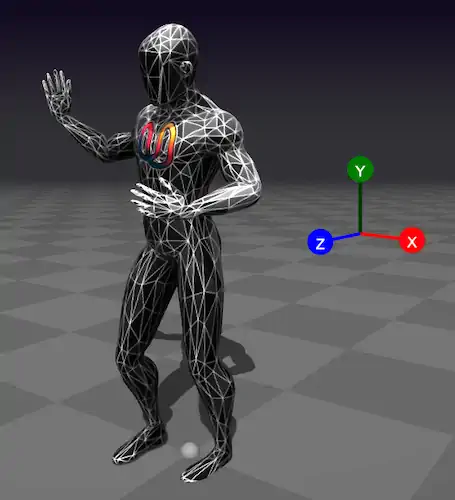
Coordinate system and axes
Uthana uses a right-handed, Y-up coordinate system consistent with Three.js, GLM, and
glTF
:
| Axis | Direction | Meaning |
|---|---|---|
| X | Right | Positive X points to the character's right when facing +Z |
| Y | Up | Positive Y points upward; the floor is at |
| Z | Forward | Positive Z is "forward" when the character has zero yaw |
Pose properties and how they map to the API
The stitch model needs to know where each character is and how it's oriented at key moments. It uses this pose data to align the prefix and suffix spatially and generate a smooth transition. Positions are {x, y, z} in meters—e.g. {x: 0.1, y: 0.95, z: 0.5} means 0.1m to the right, pelvis height 0.95m above the floor, 0.5m forward. These properties are required for both the leading (prefix) and trailing (suffix) motion—each motion gets its own StitchParamsInput with full pose data.
You should get these values from your motion loader by evaluating the motion at each required time: seek to the frame, update the animation, and read the world-space transforms from your 3D engine (e.g. getWorldPosition, getWorldQuaternion in Three.js). Pelvis position and rotation come directly from the motion; hips_forward_facing_world_yaw is computed from the left and right hip bone positions (see How to obtain these values).
Suppose you want to space two motions 1 meter apart in a straight line. You would set the prefix pelvis at the last frame (at_upper_trim_time) to {x: 0, y: 0.95, z: 0} and the suffix pelvis at the first frame (at_lower_trim_time) to {x: 0, y: 0.95, z: 1}. Without this spatial data, the stitch model has no way to know where each motion sits in the world, and the transition will look wrong.
What each property is
| Property | Type | What it represents |
|---|---|---|
root_node_world_pos | {x, y, z} (meters) | Character root position in world space. x and z are horizontal; y is height above the floor. |
root_node_world_rot | {x, y, z, w} (quaternion) | Character root orientation in world space. Identity (no rotation) is {x: 0, y: 0, z: 0, w: 1}. |
pelvis_world_pos | {x, y, z} (meters) | Pelvis bone position in world space. Used in each of at_zero_time, at_lower_trim_time, at_upper_trim_time. |
pelvis_world_rot | {x, y, z, w} (quaternion) | Pelvis bone orientation in world space. |
hips_forward_facing_world_yaw | radians | Angle around the Y axis for hips facing. Computed as atan2(forward.x, forward.z). Examples:
|
Quaternions use {x, y, z, w} with w as the scalar component. This matches Three.js, GLM,
and common game engines. See
Three.js Quaternion
and
Quaternions and spatial rotation
for more on this format. For the coordinate system and glTF reference, see above.
What they're used for
The stitch model uses root and pelvis transforms to:
- Align the two motions spatially so the character doesn't pop or drift when transitioning.
- Match facing direction so the blend looks natural.
- Preserve floor contact so the character doesn't float or sink.
Without accurate pose data, the transition can look jarring. For production, always sample from your motion loader.
Example: a single pelvis state
Each of at_zero_time, at_lower_trim_time, and at_upper_trim_time is a PelvisStateInput:
{
  "pelvis_world_pos": { "x": 0.12, "y": 0.95, "z": 0.0 },
  "pelvis_world_rot": { "x": 0, "y": 0, "z": 0, "w": 1 },
  "hips_forward_facing_world_yaw": 0
}
Root node vs. pelvis
- Root node (
root_node_world_pos,root_node_world_rot): The character's root transform in world space—typically the top-level node that contains the whole skeleton. - Pelvis: A specific bone (the hip/pelvis joint) that defines the character's center of mass and facing direction. The stitch model uses pelvis data to align the two motions spatially.
The root is the hierarchy root; the pelvis is a child bone. Their positions and rotations can differ when the character is posed.
Trim times and the three sample points
Each motion is sampled at three time points:
| Sample | When | Purpose |
|---|---|---|
at_zero_time | t = 0 | Start of the motion clip |
at_lower_trim_time | Start of the trimmed segment | Where the "useful" part of the clip begins |
at_upper_trim_time | End of the trimmed segment | Where the "useful" part ends |
- Prefix motion: The stitch uses the pose at
at_upper_trim_time(the last frame of the prefix) to connect to the suffix. - Suffix motion: The stitch uses the pose at
at_lower_trim_time(the first frame of the suffix) as the connection point.
For the prefix, keep at_upper_trim_time slightly before the clip end (e.g. motion_duration - 0.051) to avoid sampling exactly at the boundary.
How to obtain these values
You will need a motion loader (e.g. GLTF + Three.js, or your engine's equivalent) that can evaluate poses at specific times.
-
Lower and upper trim times. You first need to decide
lower_trimandupper_trim—the start and end of the segment you want to use. In the web app, the trim handles on each motion's timeline define these: drag the handles to mark the segment; the times at those positions are yourlower_trimandupper_trim.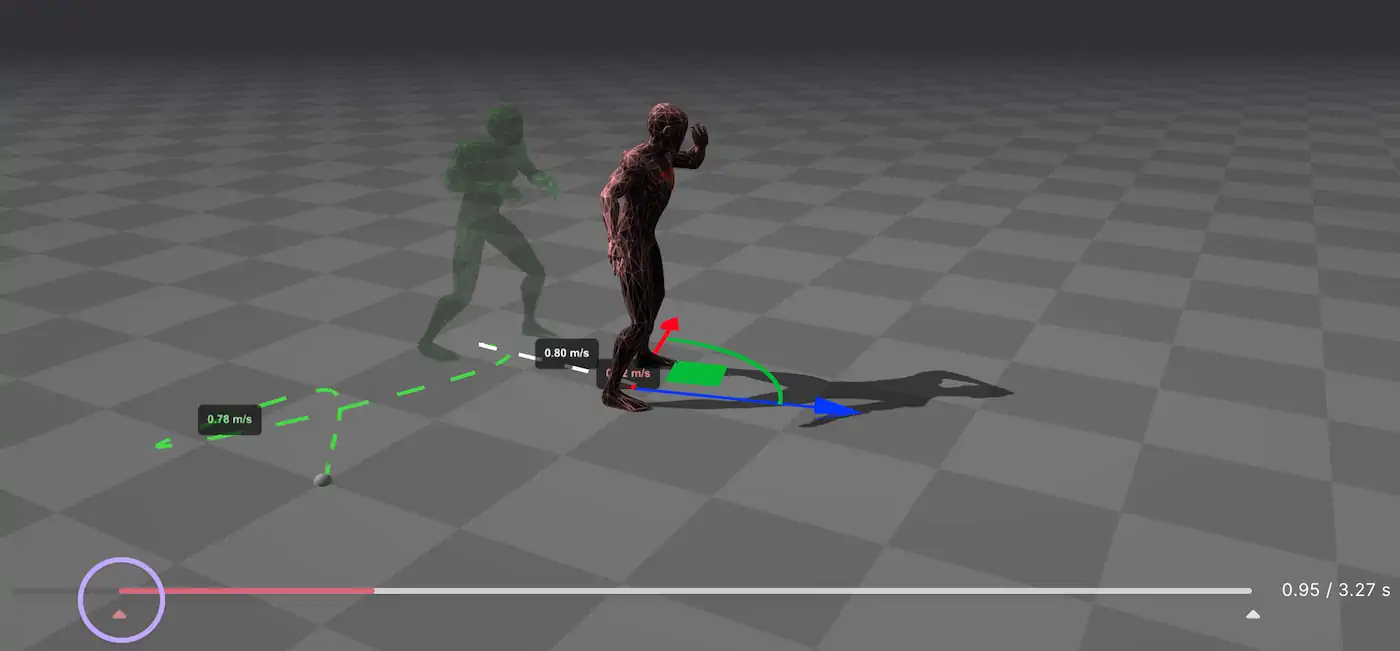
Trim handles on the timeline define the segment used for stitching—their positions give you lower_trim and upper_trim.
-
Pose data at each time. Once you have those times, sample poses at
0,lower_trim, andupper_trimfrom your motion loader. The pose data comes from pelvis and root rotation and positioning in world space—pelvis_world_pos,pelvis_world_rot, and the root transforms—plus the hips forward yaw. The web app lets you preview and adjust how the prefix and suffix characters are positioned and oriented relative to each other; the 3D view shows how pelvis rotation and positioning affect spatial alignment.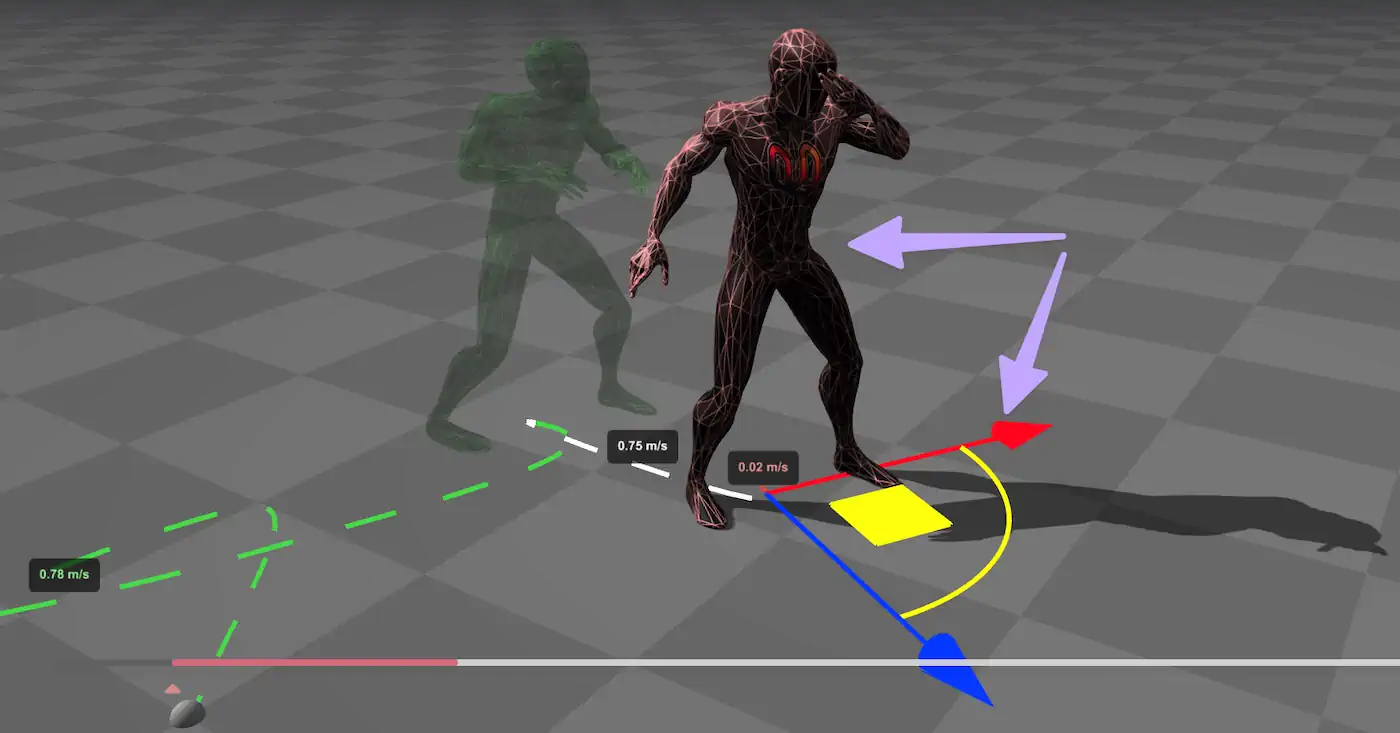
Pelvis rotation and positioning in the 3D view—this is how you get the pose data for alignment.
-
Pelvis positioning and duration. The spatial gap between the prefix and suffix connection poses, combined with
stitch_duration, can make or break a stitch. If the two poses are far apart in world space but you use a short duration, the model has to compress a large motion into a small window—the result can look rushed or unnatural. Conversely, if the poses are very close and you use a long duration, the transition may feel sluggish. Match the duration to the distance: larger gaps generally need longer durations for a smooth, believable transition. For example:- Walking (~1.2 m/s): For a 1 m gap, use
stitch_durationin the 0.8–1.2 s range; for 2 m, use 1.5–2.0 s. - Jogging (~2.5 m/s): For a 1 m gap, use 0.4–0.6 s; for 2 m, use 0.8–1.2 s.
- Walking (~1.2 m/s): For a 1 m gap, use
Summary. For programmatic use, the sampling process is:
- Load the motion (e.g. GLTF with animation) and the character skeleton.
- Seek to each time (
0,lower_trim,upper_trim) and update the animation. - Read world-space transforms for the pelvis and root from your 3D engine (e.g.
getWorldPosition,getWorldQuaternionin Three.js). - Compute
hips_forward_facing_world_yaw: Get world positions of left and right hip bones. The "hips forward" direction is perpendicular to the hip line in the horizontal plane:forward = normalize(cross(left_hip - right_hip, up)). Thenyaw = atan2(forward.x, forward.z).
Prerequisites
Before calling the stitch API, you need:
- API key: For authentication (see GraphQL API)
- Character ID: The character both motions are retargeted to (e.g.
cXi2eAP19XwQfor Uthana's default character) - Prefix motion ID: The leading motion (plays first)
- Suffix motion ID: The trailing motion (plays second)
- Pose data: Pelvis and root-node transforms sampled at time 0, lower trim, and upper trim for each motion
See How to obtain these values for the sampling process. The Uthana web app performs this automatically when you use the Stitch UI.
Step-by-step tutorial
Step 1: Authenticate your request
- Shell
- Python
- TypeScript
- C#
API_KEY="{{apiKey}}"
API_URL="https://uthana.com/graphql"
import requests

API_URL = "https://uthana.com/graphql"
API_KEY = "{{apiKey}}"
const API_URL = "https://uthana.com/graphql";
const API_KEY = "{{apiKey}}";
private const string ApiUrl = "https://uthana.com/graphql";
private readonly string _apiKey = "{{apiKey}}";
Step 2: Build the stitch input
The MotionStitchInput requires character_id, prefix, and suffix. Each of prefix and suffix is a StitchParamsInput with motion metadata and pose samples at three time points.
If you don't yet have a motion loader, you can use these placeholder values for the pose fields to satisfy the schema and test the API flow. They are structurally valid but will not yield good stitch quality—for production, always sample from your motion data.
| Property | Placeholder value | Notes |
|---|---|---|
root_node_world_pos | {x: 0, y: 0, z: 0} | Origin. Replace with sampled data for real stitches. |
root_node_world_rot | {x: 0, y: 0, z: 0, w: 1} | Identity (no rotation). |
pelvis_world_pos (in each sample) | {x: 0, y: 0, z: 0} | Origin. |
pelvis_world_rot (in each sample) | {x: 0, y: 0, z: 0, w: 1} | Identity. |
hips_forward_facing_world_yaw | 0 | Facing +Z. |
For stitch_duration, stitch_loop, prompt, and other optional fields, see Recommended defaults.
Required fields (must be derived from your motion data):
motion_id,motion_duration,motion_lower_trim_time,motion_upper_trim_time,motion_lower_trim_fraction,motion_upper_trim_fractionroot_node_world_pos,root_node_world_rot(character root at trim points)at_zero_time,at_lower_trim_time,at_upper_trim_time(pelvis position, rotation, andhips_forward_facing_world_yawin radians)
For prefix motions, keep the upper trim time slightly before the clip end (e.g. duration - 0.051) to avoid sampling at the exact boundary, which improves stitch quality.
- Shell
- Python
- TypeScript
- C#
# Build stitch_input JSON (replace placeholders with your motion data)
# See Recommended defaults and API reference for full structure
CHARACTER_ID="cXi2eAP19XwQ"
PREFIX_MOTION_ID="your_prefix_motion_id"
SUFFIX_MOTION_ID="your_suffix_motion_id"
STITCH_DURATION=2.0

# Helper: build a PelvisStateInput (pelvis_world_pos, pelvis_world_rot, hips_forward_facing_world_yaw)
# You must sample these from your motion at t=0, lower_trim, upper_trim
def build_pelvis_state(pelvis_pos, pelvis_rot, hips_yaw_rad):
    """Build a PelvisStateInput from sampled pose data."""
    return {
        "pelvis_world_pos": {"x": pelvis_pos[0], "y": pelvis_pos[1], "z": pelvis_pos[2]},
        "pelvis_world_rot": {"x": pelvis_rot[0], "y": pelvis_rot[1], "z": pelvis_rot[2], "w": pelvis_rot[3]},
        "hips_forward_facing_world_yaw": hips_yaw_rad,
    }

def build_stitch_params(motion_id, motion_duration, lower_trim, upper_trim, root_pos, root_rot, at_zero, at_lower, at_upper, stitch_duration=2.0, prompt=""):
    """Build StitchParamsInput. Pose data (at_zero, at_lower, at_upper) must be sampled from motion."""
    return {
        "prompt": prompt,
        "motion_id": motion_id,
        "stitch_loop": False,
        "stitch_duration": stitch_duration,
        "motion_duration": motion_duration,
        "motion_lower_trim_time": lower_trim,
        "motion_upper_trim_time": upper_trim,
        "motion_lower_trim_fraction": lower_trim / motion_duration,
        "motion_upper_trim_fraction": upper_trim / motion_duration,
        "root_node_world_pos": {"x": root_pos[0], "y": root_pos[1], "z": root_pos[2]},
        "root_node_world_rot": {"x": root_rot[0], "y": root_rot[1], "z": root_rot[2], "w": root_rot[3]},
        "at_zero_time": at_zero,
        "at_lower_trim_time": at_lower,
        "at_upper_trim_time": at_upper,
    }

# Example: build prefix params (you must sample pose data from your motion loader)
# at_zero = build_pelvis_state(...)  # sampled at t=0
# at_lower = build_pelvis_state(...)  # sampled at lower_trim
# at_upper = build_pelvis_state(...)  # sampled at upper_trim
# prefix = build_stitch_params(PREFIX_MOTION_ID, duration, lower, upper, root_pos, root_rot, at_zero, at_lower, at_upper)
# suffix = build_stitch_params(SUFFIX_MOTION_ID, ...)
# stitch_input = {"character_id": CHARACTER_ID, "prefix": prefix, "suffix": suffix}
interface Vector3 {
  x: number;
  y: number;
  z: number;
}

interface Quaternion {
  x: number;
  y: number;
  z: number;
  w: number;
}

interface PelvisState {
  pelvis_world_pos: Vector3;
  pelvis_world_rot: Quaternion;
  hips_forward_facing_world_yaw: number;
}

function buildPelvisState(
  pelvisPos: [number, number, number],
  pelvisRot: [number, number, number, number],
  hipsYawRad: number,
): PelvisState {
  return {
    pelvis_world_pos: { x: pelvisPos[0], y: pelvisPos[1], z: pelvisPos[2] },
    pelvis_world_rot: { x: pelvisRot[0], y: pelvisRot[1], z: pelvisRot[2], w: pelvisRot[3] },
    hips_forward_facing_world_yaw: hipsYawRad,
  };
}

function buildStitchParams(
  motionId: string,
  motionDuration: number,
  lowerTrim: number,
  upperTrim: number,
  rootPos: Vector3,
  rootRot: Quaternion,
  atZero: PelvisState,
  atLower: PelvisState,
  atUpper: PelvisState,
  stitchDuration = 2.0,
  prompt = "",
) {
  return {
    prompt,
    motion_id: motionId,
    stitch_loop: false,
    stitch_duration: stitchDuration,
    motion_duration: motionDuration,
    motion_lower_trim_time: lowerTrim,
    motion_upper_trim_time: upperTrim,
    motion_lower_trim_fraction: lowerTrim / motionDuration,
    motion_upper_trim_fraction: upperTrim / motionDuration,
    root_node_world_pos: rootPos,
    root_node_world_rot: rootRot,
    at_zero_time: atZero,
    at_lower_trim_time: atLower,
    at_upper_trim_time: atUpper,
  };
}

// stitch_input = { character_id, prefix: buildStitchParams(...), suffix: buildStitchParams(...) }
public class PelvisState
{
    public Vector3 PelvisWorldPos { get; set; }
    public Quaternion PelvisWorldRot { get; set; }
    public double HipsForwardFacingWorldYaw { get; set; }
}

public static object BuildStitchParams(
    string motionId,
    double motionDuration,
    double lowerTrim,
    double upperTrim,
    Vector3 rootPos,
    Quaternion rootRot,
    PelvisState atZero,
    PelvisState atLower,
    PelvisState atUpper,
    double stitchDuration = 2.0,
    string prompt = "")
{
    return new
    {
        prompt,
        motion_id = motionId,
        stitch_loop = false,
        stitch_duration = stitchDuration,
        motion_duration = motionDuration,
        motion_lower_trim_time = lowerTrim,
        motion_upper_trim_time = upperTrim,
        motion_lower_trim_fraction = lowerTrim / motionDuration,
        motion_upper_trim_fraction = upperTrim / motionDuration,
        root_node_world_pos = new { x = rootPos.X, y = rootPos.Y, z = rootPos.Z },
        root_node_world_rot = new { x = rootRot.X, y = rootRot.Y, z = rootRot.Z, w = rootRot.W },
        at_zero_time = atZero,
        at_lower_trim_time = atLower,
        at_upper_trim_time = atUpper,
    };
}
Step 3: Call the mutation
- Shell
- Python
- TypeScript
- C#
curl -X POST "$API_URL" \
  -u "$API_KEY": \
  -H "Content-Type: application/json" \
  -d '{
    "query": "mutation CreateEnhancedStitchedMotion($stitch_input: MotionStitchInput!) { create_enhanced_stitched_motion(stitch_input: $stitch_input) { motion { id } } }",
    "variables": {
      "stitch_input": {
        "character_id": "'"$CHARACTER_ID"'",
        "prefix": { "prompt": "", "motion_id": "'"$PREFIX_MOTION_ID"'", "stitch_loop": false, "stitch_duration": 2.0, "motion_duration": 5.0, "motion_lower_trim_time": 0, "motion_upper_trim_time": 4.949, "motion_lower_trim_fraction": 0, "motion_upper_trim_fraction": 0.9898, "root_node_world_pos": {"x":0,"y":0,"z":0}, "root_node_world_rot": {"x":0,"y":0,"z":0,"w":1}, "at_zero_time": {"pelvis_world_pos":{"x":0,"y":0,"z":0},"pelvis_world_rot":{"x":0,"y":0,"z":0,"w":1},"hips_forward_facing_world_yaw":0}, "at_lower_trim_time": {"pelvis_world_pos":{"x":0,"y":0,"z":0},"pelvis_world_rot":{"x":0,"y":0,"z":0,"w":1},"hips_forward_facing_world_yaw":0}, "at_upper_trim_time": {"pelvis_world_pos":{"x":0,"y":0,"z":0},"pelvis_world_rot":{"x":0,"y":0,"z":0,"w":1},"hips_forward_facing_world_yaw":0} },
        "suffix": { "prompt": "", "motion_id": "'"$SUFFIX_MOTION_ID"'", "stitch_loop": false, "stitch_duration": 2.0, "motion_duration": 5.0, "motion_lower_trim_time": 0.05, "motion_upper_trim_time": 5.0, "motion_lower_trim_fraction": 0.01, "motion_upper_trim_fraction": 1.0, "root_node_world_pos": {"x":0,"y":0,"z":0}, "root_node_world_rot": {"x":0,"y":0,"z":0,"w":1}, "at_zero_time": {"pelvis_world_pos":{"x":0,"y":0,"z":0},"pelvis_world_rot":{"x":0,"y":0,"z":0,"w":1},"hips_forward_facing_world_yaw":0}, "at_lower_trim_time": {"pelvis_world_pos":{"x":0,"y":0,"z":0},"pelvis_world_rot":{"x":0,"y":0,"z":0,"w":1},"hips_forward_facing_world_yaw":0}, "at_upper_trim_time": {"pelvis_world_pos":{"x":0,"y":0,"z":0},"pelvis_world_rot":{"x":0,"y":0,"z":0,"w":1},"hips_forward_facing_world_yaw":0} }
      }
    }
  }'
Note: Replace the placeholder pose values (zeros) with data sampled from your motions. The example structure is valid but will produce better results with real pose data.
query = """
mutation CreateEnhancedStitchedMotion($stitch_input: MotionStitchInput!) {
  create_enhanced_stitched_motion(stitch_input: $stitch_input) {
    motion {
      id
    }
  }
}
"""

# stitch_input = {"character_id": CHARACTER_ID, "prefix": prefix_params, "suffix": suffix_params}
response = requests.post(
    API_URL,
    auth=(API_KEY, ""),
    json={"query": query, "variables": {"stitch_input": stitch_input}},
)

result = response.json()
if "errors" in result:
    print(f"Error: {result['errors']}")
else:
    motion = result["data"]["create_enhanced_stitched_motion"]["motion"]
    print(f"Created stitched motion: {motion['id']}")
const query = `
  mutation CreateEnhancedStitchedMotion($stitch_input: MotionStitchInput!) {
    create_enhanced_stitched_motion(stitch_input: $stitch_input) {
      motion {
        id
      }
    }
  }
`;

const response = await fetch(API_URL, {
  method: "POST",
  headers: {
    "Content-Type": "application/json",
    Authorization: `Basic ${btoa(`${API_KEY}:`)}`,
  },
  body: JSON.stringify({
    query,
    variables: { stitch_input },
  }),
});

const json = await response.json();
if (json.errors) {
  console.error("GraphQL errors:", json.errors);
} else {
  const motion = json.data.create_enhanced_stitched_motion.motion;
  console.log(`Created stitched motion: ${motion.id}`);
}
var query = @"
    mutation CreateEnhancedStitchedMotion($stitch_input: MotionStitchInput!) {
        create_enhanced_stitched_motion(stitch_input: $stitch_input) {
            motion {
                id
            }
        }
    }";

var request = new
{
    query = query,
    variables = new { stitch_input = stitchInput }
};

var json = JsonSerializer.Serialize(request);
var content = new StringContent(json, Encoding.UTF8, "application/json");

var authValue = Convert.ToBase64String(Encoding.UTF8.GetBytes($"{_apiKey}:"));
_httpClient.DefaultRequestHeaders.Authorization =
    new System.Net.Http.Headers.AuthenticationHeaderValue("Basic", authValue);

var response = await _httpClient.PostAsync(ApiUrl, content);
response.EnsureSuccessStatusCode();

var responseJson = await response.Content.ReadAsStringAsync();
var result = JsonSerializer.Deserialize<GraphQLResponse<CreateEnhancedStitchedMotionData>>(responseJson);

var motion = result.Data.CreateEnhancedStitchedMotion.Motion;
Console.WriteLine($"Created stitched motion: {motion.Id}");
Step 4: Handle the response
The mutation returns the new motion ID immediately:
{
  "data": {
    "create_enhanced_stitched_motion": {
      "motion": {
        "id": "{new_motion_id}"
      }
    }
  }
}
Recommended defaults
Use these values when building your stitch payload:
| Field | Value | Rationale |
|---|---|---|
stitch_duration | 2.0 | Default transition length. Range 0.1–3.0 seconds. Shorter = snappier, longer = smoother. |
stitch_loop | false | Set this value to true to create a looped motion. |
prompt | "" | Empty string for deterministic behavior. The UI default "A person " is filtered out and has no semantic effect. |
| Prefix upper trim | motion_duration - 0.051 | Slightly before clip end improves stitch quality (avoids exact-boundary sampling). |
| Quaternion identity | {x:0,y:0,z:0,w:1} | Use only when your coordinate system matches; otherwise sample from motion. |
All position and rotation fields must come from sampling your motion at the trim points. Use a GLTF/Three.js–style loader to evaluate the character pose at t=0, lower_trim, and upper_trim, then extract pelvis world position, pelvis world rotation (quaternion), and hips forward-facing yaw (e.g. Math.atan2(forward.x, forward.z)).
How to tune
- Duration: Increase
stitch_duration(up to 3.0 s) for smoother transitions; decrease for quicker cuts. - Trim windows: Narrower trim ranges focus the stitch on a smaller segment; ensure prefix upper and suffix lower are temporally compatible.
- Prompt: Optional. When provided (non-empty, not
"A person"), can influence transition style. Empty is recommended for reproducibility. - Character positioning: Root and pelvis transforms define spatial alignment. Ensure prefix end pose and suffix start pose are reasonably aligned for best results.
Error handling
Common errors and how to resolve them:
| Error | Cause | Resolution |
|---|---|---|
User does not have access to prefix motion | Motion not in your org or invalid ID | Verify motion IDs and org membership |
User does not have access to suffix motion | Same as above | Same as above |
| Invalid/malformed input | Missing required fields or wrong types | Check GraphQL reference for schema |
| Poor stitch quality | Incorrect or placeholder pose data | Sample real pose data from your motion at the trim points |
- Shell
- Python
- TypeScript
- C#
if echo "$RESPONSE" | jq -e '.errors' > /dev/null; then
    echo "Error occurred:"
    echo "$RESPONSE" | jq '.errors'
fi
result = response.json()
if "errors" in result:
    for error in result["errors"]:
        print(f"Error: {error['message']}")
        if "extensions" in error:
            print(f"Code: {error['extensions'].get('code', 'N/A')}")
const json = await response.json();
if (json.errors) {
  json.errors.forEach((err: any) => {
    console.error(`Error: ${err.message}`);
    if (err.extensions) console.error(`Code: ${err.extensions.code || "N/A"}`);
  });
}
if (result.Errors != null && result.Errors.Length > 0)
{
    foreach (var error in result.Errors)
    {
        Console.WriteLine($"Error: {error.Message}");
        if (error.Extensions != null && error.Extensions.ContainsKey("code"))
            Console.WriteLine($"Code: {error.Extensions["code"]}");
    }
}
Legacy endpoint
The create_stitched_motion mutation (with leading_motion_id, trailing_motion_id, duration) is deprecated. Migrate to create_enhanced_stitched_motion for better quality and control. See the GraphQL reference for the legacy schema.
Looping
Looping means generating a motion that can repeat seamlessly: the last frame transitions back into the first frame without a visible "pop" in pose, facing, or root motion.
Loop modes: progressive vs. cyclical
- Cyclical (closed) loops: The character returns to the same world-space root position and facing each cycle (e.g. idle, breathing, in-place jog). These are easiest to loop because the start and end are naturally compatible.
- Progressive (open) loops: The character keeps translating/rotating each cycle (e.g. walk-forward with root motion). A good loop still has a seamless join, but the character's root position will advance every repetition.
How looping differs from regular stitching
Where regular stitching connects the end of one motion to the start of another motion, looping connects the end of one motion to the start of the same motion. With looping, your goal is specifically to connect a motion back to itself (or to a compatible "restart" pose) so it can repeat cleanly.
What you need for looping
- Pick joint points carefully: choose
trim_start_pct(near the start) andtrim_end_pct(near the end) where the poses are compatible (similar contact, similar facing). Avoid sampling exactly at clip boundaries. - Root/pelvis alignment matters more:
- Cyclical loops: you can often use sampled world-space transforms directly if the clip was authored to start/end in the same place.
- Progressive loops: you usually need to ensure the pose at
trim_end_pctis positioned/oriented to match the pose attrim_start_pctin world space (same facing at the join, and positions aligned so the transition doesn't jump). This keeps the join seamless while allowing motion to continue advancing each repetition.
- Tune
zone_duration: increase it when the start/end poses are similar but not identical; decrease it when the clip is already very close to loopable and you want a tighter join. If you're unsure whether your loop is cyclical or progressive, inspect the root node translation over time: if the root's world position drifts each cycle, you're in progressive territory and should treat the join as a "continue moving" connection rather than a "return to origin" connection.
Required fields:
character_idmotion_idloop_mode:closed(default) - a cyclical loop: the character will end in the same global position as the start frameopen- a progressive loop: the character will translate to the specifiedzone_end_positionat the end of the animation
Optional fields:
trim_start_pct:0.0(default) - the starting percent at which to trim the original motion to be loopedtrim_end_pct:1.0(default) - the ending percent at which to trim the original motion to be loopedzone_duration:2.0(default) - duration of the editable zone of the loop in secondszone_mode:modify(default) - preserves the length of the animation by modifying existing keyframesextend- increases the length of the animation by adding new keyframes
zone_end_position:null(default) - the goal position of the character at the end of the loop, applicable for open loops only. If not specified for open loop, it is calculated as continuing along average velocity of animation.- The
ZoneEndPositionInputrequiresx,y, andfacing_angle. Bothxandyare a target planar position along the given axis, withfacing_anglerepresenting the target facing angle in radians.
- The
Step-by-step tutorial
Step 1: Authenticate your request
- Shell
- Python
- TypeScript
- C#
API_KEY="{{apiKey}}"
API_URL="https://uthana.com/graphql"
import requests

API_URL = "https://uthana.com/graphql"
API_KEY = "{{apiKey}}"
const API_URL = "https://uthana.com/graphql";
const API_KEY = "{{apiKey}}";
private const string ApiUrl = "https://uthana.com/graphql";
private readonly string _apiKey = "{{apiKey}}";
Step 2: Call the mutation
- Shell
- Python
- TypeScript
- C#
CHARACTER_ID="cXi2eAP19XwQ"
MOTION_ID="your_motion_id"
TRIM_START_PCT=0.0
TRIM_END_PCT=1.0
ZONE_DURATION=2.0
LOOP_MODE="closed"
ZONE_MODE="modify"
ZONE_END_X=0.0
ZONE_END_Y=0.0
FACING_ANGLE=0.0

curl -X POST "$API_URL" \
  -u "$API_KEY": \
  -H "Content-Type: application/json" \
  -d '{
    "query": "mutation CreateLoopedMotion($character_id: String!, $motion_id: String!, $trim_start_pct: Float, $trim_end_pct: Float, $zone_duration: Float, $loop_mode: String!, $zone_mode: String, $zone_end_position: ZoneEndPositionInput) { create_looped_motion(character_id: $character_id, motion_id: $motion_id, trim_start_pct: $trim_start_pct, trim_end_pct: $trim_end_pct, zone_duration: $zone_duration, loop_mode: $loop_mode, zone_mode: $zone_mode, zone_end_position: $zone_end_position) { motion { id name } } }",
    "variables": {
      "character_id": "'"$CHARACTER_ID"'",
      "motion_id": "'"$MOTION_ID"'",
      "trim_start_pct": '"$TRIM_START_PCT"',
      "trim_end_pct": '"$TRIM_END_PCT"',
      "zone_duration": '"$ZONE_DURATION"',
      "loop_mode": "'"$LOOP_MODE"'",
      "zone_mode": "'"$ZONE_MODE"'",
      "zone_end_position": {"x": '"$ZONE_END_X"', "y": '"$ZONE_END_Y"', "facing_angle": '"$FACING_ANGLE"'}
    }
  }'
character_id = "cXi2eAP19XwQ"
motion_id = "your_motion_id"
trim_start_pct = 0.0
trim_end_pct = 1.0
zone_duration = 2.0
loop_mode = "closed"  # or "open"
zone_mode = "modify"  # or "extend"
zone_end_position = {"x": 0.0, "y": 0.0, "facing_angle": 0.0}  # or None for open-loop default

query = """
mutation CreateLoopedMotion($character_id: String!, $motion_id: String!, $trim_start_pct: Float, $trim_end_pct: Float, $zone_duration: Float, $loop_mode: String!, $zone_mode: String, $zone_end_position: ZoneEndPositionInput) {
  create_looped_motion(character_id: $character_id, motion_id: $motion_id, trim_start_pct: $trim_start_pct, trim_end_pct: $trim_end_pct, zone_duration: $zone_duration, loop_mode: $loop_mode, zone_mode: $zone_mode, zone_end_position: $zone_end_position) {
    motion {
      id
    }
  }
}
"""

variables = {
    "character_id": character_id,
    "motion_id": motion_id,
    "trim_start_pct": trim_start_pct,
    "trim_end_pct": trim_end_pct,
    "zone_duration": zone_duration,
    "loop_mode": loop_mode,
    "zone_mode": zone_mode,
    "zone_end_position": zone_end_position,
}

response = requests.post(
    API_URL,
    auth=(API_KEY, ""),
    json={"query": query, "variables": variables},
)

result = response.json()
if "errors" in result:
    print(f"Error: {result['errors']}")
else:
    motion = result["data"]["create_looped_motion"]["motion"]
    print(f"Created looped motion: {motion['id']}")
const variables = {
  character_id: "cXi2eAP19XwQ",
  motion_id: "your_motion_id",
  trim_start_pct: 0.0,
  trim_end_pct: 1.0,
  zone_duration: 2.0,
  loop_mode: "closed" as const, // or "open"
  zone_mode: "modify" as const, // or "extend"
  zone_end_position: { x: 0.0, y: 0.0, facing_angle: 0.0 } as { x: number; y: number; facing_angle?: number } | null,
};

const query = `
  mutation CreateLoopedMotion($character_id: String!, $motion_id: String!, $trim_start_pct: Float, $trim_end_pct: Float, $zone_duration: Float, $loop_mode: String!, $zone_mode: String, $zone_end_position: ZoneEndPositionInput) {
    create_looped_motion(character_id: $character_id, motion_id: $motion_id, trim_start_pct: $trim_start_pct, trim_end_pct: $trim_end_pct, zone_duration: $zone_duration, loop_mode: $loop_mode, zone_mode: $zone_mode, zone_end_position: $zone_end_position) {
      motion {
        id
      }
    }
  }
`;

const response = await fetch(API_URL, {
  method: "POST",
  headers: {
    "Content-Type": "application/json",
    Authorization: `Basic ${btoa(`${API_KEY}:`)}`,
  },
  body: JSON.stringify({ query, variables }),
});

const json = await response.json();
if (json.errors) {
  console.error("GraphQL errors:", json.errors);
} else {
  const motion = json.data.create_looped_motion.motion;
  console.log(`Created looped motion: ${motion.id}`);
}
var query = @"
    mutation CreateLoopedMotion($character_id: String!, $motion_id: String!, $trim_start_pct: Float, $trim_end_pct: Float, $zone_duration: Float, $loop_mode: String!, $zone_mode: String, $zone_end_position: ZoneEndPositionInput) {
        create_looped_motion(character_id: $character_id, motion_id: $motion_id, trim_start_pct: $trim_start_pct, trim_end_pct: $trim_end_pct, zone_duration: $zone_duration, loop_mode: $loop_mode, zone_mode: $zone_mode, zone_end_position: $zone_end_position) {
            motion {
                id
            }
        }
    }";

var request = new
{
    query,
    variables = new
    {
        character_id = "cXi2eAP19XwQ",
        motion_id = "your_motion_id",
        trim_start_pct = 0.0,
        trim_end_pct = 1.0,
        zone_duration = 2.0,
        loop_mode = "closed",
        zone_mode = "modify",
        zone_end_position = new { x = 0.0, y = 0.0, facing_angle = 0.0 },
    },
};

var json = JsonSerializer.Serialize(request);
var content = new StringContent(json, Encoding.UTF8, "application/json");

var authValue = Convert.ToBase64String(Encoding.UTF8.GetBytes($"{_apiKey}:"));
_httpClient.DefaultRequestHeaders.Authorization =
    new System.Net.Http.Headers.AuthenticationHeaderValue("Basic", authValue);

var response = await _httpClient.PostAsync(ApiUrl, content);
response.EnsureSuccessStatusCode();

var responseJson = await response.Content.ReadAsStringAsync();
using var doc = JsonDocument.Parse(responseJson);
var motionId = doc.RootElement.GetProperty("data").GetProperty("create_looped_motion").GetProperty("motion").GetProperty("id").GetString();
Console.WriteLine($"Created looped motion: {motionId}");
Step 3: Handle the response
The mutation returns the new motion ID immediately:
{
  "data": {
    "create_looped_motion": {
      "motion": {
        "id": "{new_motion_id}"
      }
    }
  }
}
Next steps
- Text to motion — Generate motions from text prompts
- Locomotion — Controllable, looptable travel in a chosen direction
- Video to motion — Convert video to motion
- Download a motion — Export FBX, GLB, BVH
- Unitree G1 — Unitree G1 robot (
.csv) download - GraphQL API reference — Full schema and
create_enhanced_stitched_motioncontract